Mobile Inspector App
Mobile Inspector App User Guide 📱
Can I inspect without the App installed?
Where can I find the Android App?
Where can I find the iOS App?
Account Setup and Administration
Accounting with Intuit QuickBooks Online
Exporting Property Data
Hardware and Software Requirements
Historical Violation Imports
How do I edit CC&R Articles?
How do I get my data out of Buildium?
Importing Property Lists
Is HOALife down?
Matched Ownership - Linking Properties
Property List Format
Security and Backup
User Setup
Adding Users to Accounts
Administrator Permissions
Architectural Committee Member Permissions
Architectural Committee Voter Permissions
Board Member Permissions
Inspector Permissions
Manager Permissions
Notification Preferences
Read Only Permissions
Reset Password
Staff Permissions
Dashboard: Features & Settings
AI Settings
Annotation
Association Website Feature
Custom Property Information
Document Repository
HOALife Dashboard Tour
Owner Directory
Portal Access with QR Codes and PINs
Portal Announcement
Property Notes
Reports, Summaries, and Board Deliverables
Shared Inbox
Tags!
Violation Management & Notices
Automatic Violation Closed Emails
Changing the Style of a Violation Stock Notice
Repeat Violations
Tracking Violation Resolution (Closing)
Violation Notice Cover Letters
Violation Notice Deliveries
Violation Notices
Video Tutorials
Adding & Editing CC&R Articles - Video
Adding New Users - Video
Architectural Requests Overview - Video
Bulk Communications - Video
Creating Invoices through HOALife - Video
Document Repository - Video
HOALife Owner's Portal Tutorial Video - For Homeowners
Online Voting - How to Set Up - Video
Property Conversations - Video
Property Ownership Changes - Video
Tags! - Video
Updating Property Pins - Video
Violation Notice Delivery - Video
Calendars & Events
Escalations
Communications
Bulk Email Conversations
Bulk Letters
Dynamic Variables in Letter & Email Templates
Ensuring Email Delivery From HOALife
How to Generate Mailing Labels
Message to Management
Property Conversations
Property Email Templates
Property Letter Templates
Property Letters
Return Email Addresses
SMS Broadcasts
Sending a Welcome to HOALife Email & Letter
Payments & Invoicing
Homeowner Payment Options - Auto Pay
Invoicing with Quickbooks Online
Payment Posting Timeline
🏦 Payments Administration Guide
Owner Series
Homeowner Payments Guide
Maintenance Requests & CCR Violation Submissions
Owner Message to Manager
Owner Portal Login
Owner Series - How to Cast Your Vote
Owner Series - How to Submit an Architectural Request
Owner's Portal Tutorial
Updating Your Contact Information - Owner Level
Architectural Requests
Architectural Forms - View as Generic Request Form
Architectural Letter and Email Templates
Architectural Requests Overview
Creating Architectural Request Forms
Payments: Charging for Architectural Request Submissions
Assets & Work Orders
Inspections
Add an out-of-inspection violation to a property
Advanced Routing
Customized Inspection Routing
Inspection Summary Report
Using the HOALife Inspector App to Complete An Inspection
Online Voting
Property Ownership Updates and Changes
- All Categories
- Communications
- Message to Management
Message to Management

HOALife's Message to Management feature allows owners the ability to directly email the Board of Directors/Management Team straight from their Owner's Portal. Along with Property Conversations and Bulk Email Messaging, this is another tool that your Association can employ to effectively and effiencently communicate with your owners.
By using the Message Management tool, owner's have the power to initiate a message. As a Board, you can feel confident that these messages do not get lost in someone's inbox or delivered to the wrong account. Any message to management will be automatically connected to the property who sent the message and any dashboard user with appropriate access can then view and reply from the property's dashboard page.
For more information on how an owner can send a Message to Management check out this Owner Series Video Tutorial: Message to Manager
Settings - Message View
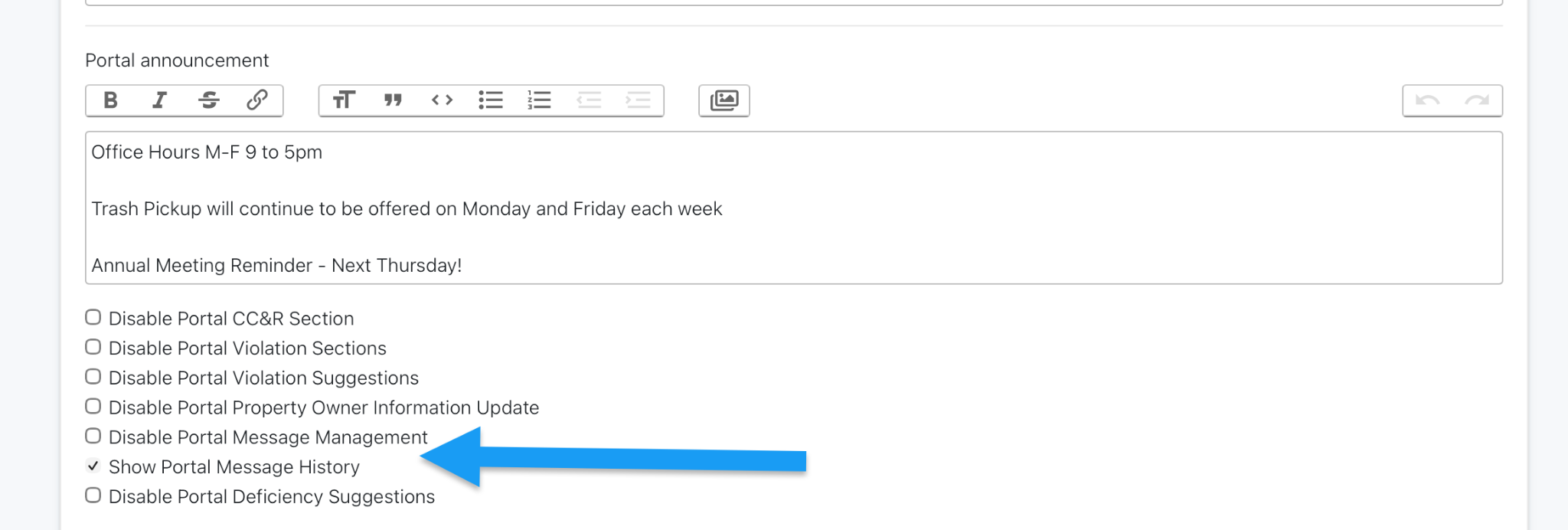
As a Dashboard User, you have the ability to choose if the owner’s portal displays a record of Association messaging. Once an owner logs into the portal, they would then be able to view all past property conversations and bulk messaging from your Association in a list format for easy access. Owners can then review any prior messaging as well as reply directly to a conversation thread. This keeps communications right at their fingertips and (hopefully!) cutting down the number of duplicate or new email messages on the same topic.
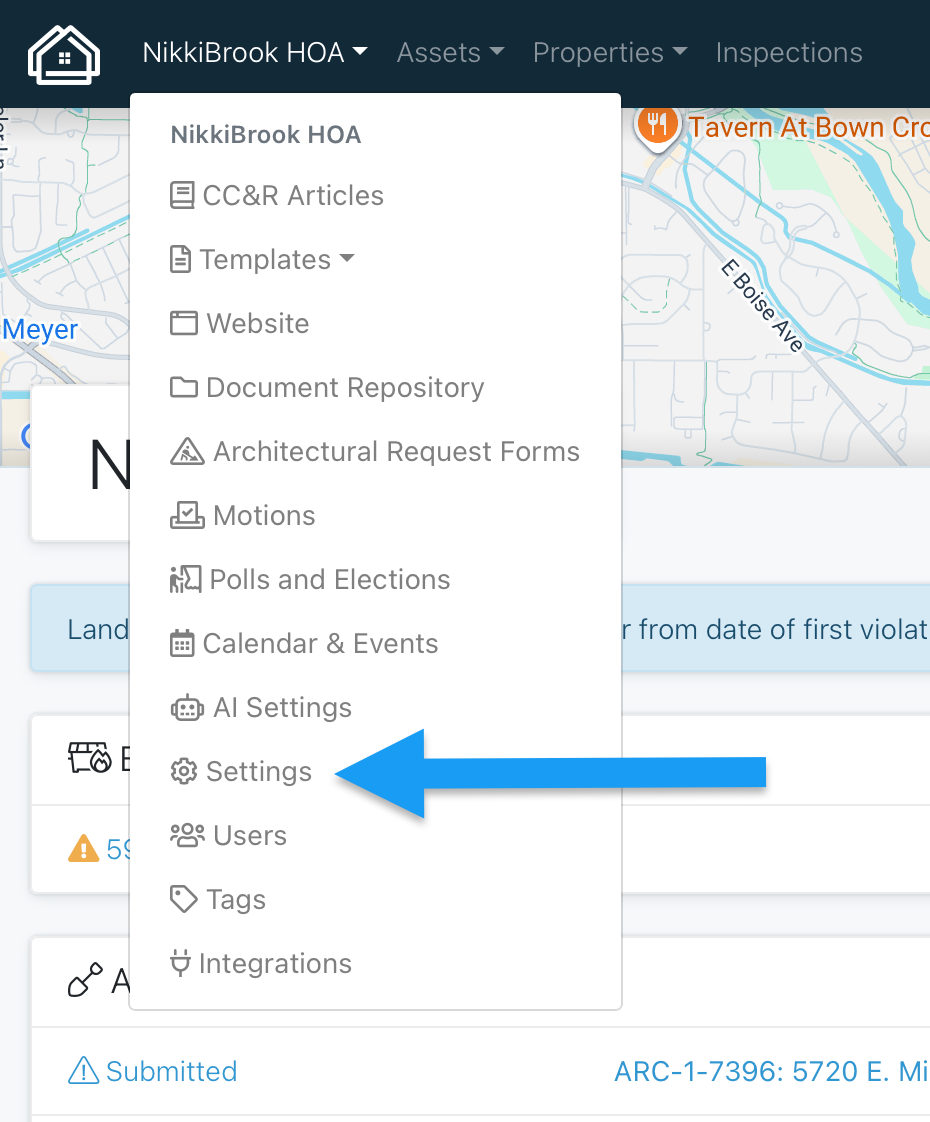
To enable this feature, navigate to your Settings page from your Association drop down menu on your HOALife Dashboard.
From here you will check the box for “Show Portal Message History”. You will also want to ensure that you do not have “Disable Portal Message Management” checked. Please see the snip below for the correct settings to enable this feature.
Be sure to scroll to the bottom of the page and click the blue update button to save!
Owners can now view and access all Association messaging in their Owner’s portal by selecting “Message Management”. From this page, they can reply to any past message in the list by selecting that message or can initiate a new message by clicking "New Message".